Game Import Guide
Supported Formats & Import Methods
Section titled “Supported Formats & Import Methods”Manic EMU supports the following game file formats:
- Bandai WonderSwan/Color WS/WSC (.ws .wsc .pc2 .pcv2)
- Adobe Flash FLASH (.swf)
- Nintendo Wii (.rvz .wbfs .ciso .wia .iso .wad .dol .elf)
- Nintendo GameCube NGC (.gcm .gcz .rvz .iso .dol .elf)
- Commodore Amiga (.adf .adz .dms .fdi .ipf .hdf .hdz .lha .slave .info .cue .ccd .nrg .mds .iso .chd .uae .m3u .zip .7z .rp9)
- Commodore 64 C64 (.d64 .d71 .d80 .d81 .d82 .g64 .g41 .x64 .t64 .tap .prg .p00 .crt .bin .zip .gz .d6z .d7z .d8z .g6z .g4z .x6z .cmd .m3u .vfl .vsf .nib .nbz .d2m .d4m)
- Neo Geo Pocket/Color NGP/NGPC (.ngp .ngc .ngpc .npc)
- PC-Engine PCE (.pce .sgx .cue .ccd .chd .toc .m3u)
- Symbian (.sis .sisx .n-gage .7z .zip .rar)
- Microsoft DOS (.zip .dosz .exe .com .bat .iso .cue .img .ima .vhd .jrc .tc .m3u .conf)
- Sun Microsystems J2ME (.jar)
- DOOM (.wad .iwad .pwad)
- Atari Jaguar (.j64 .jag .rom .abs .cof .bin .prg)
- Atari Lynx (.lnx .o)
- Atari 7800 ProSystem (.a78 .bin .cdf)
- Atari 5200 SuperSystem (.a52 .bin)
- Atari 2600 (.a26 .bin)
- Arcade (.zip .7z .cmd)
- Sega Dreamcast (.cdi .gdi .chd .cue .bin .m3u)
- SONY PlayStation (.cue .m3u .pbp .chd .ccd)
- Nintendo Pokémon Mini (.min)
- Nintendo Virtual Boy (.vb .vboy)
- Nintendo 64 (.n64 .z64 .v64)
- Sega Saturn(.iso .chd .ccd)
- Sega Mega Drive/Genesis (.md .gen .smd .bin)
- Sega Mega-CD/Sega CD (.chd .iso)
- Sega Super 32X/Genesis 32X (.32x)
- Sega Master System (.sms .bms .bin)
- Sega Game Gear (.gg .bin)
- Sega SG-1000 (.sg)
- SONY PSP (.elf .iso .cso .prx .pbp .chd)
- Nintendo 3DS (.3ds .app .cci .cxi .cia)
- Nintendo DS (.ds .nds)
- Nintendo Game Boy (.gb)
- Nintendo Game Boy Color (.gbc)
- Nintendo Game Boy Advance (.gba)
- Nintendo Entertainment System (.fc .nes .unf .unif)
- Nintendo Famicom Disk System (.fds)
- Nintendo Super Entertainment System (.sfc .snes .fig .smc)
- Compressed Files (.zip .7z)
Game Save file formats:
- Bandai WonderSwan/Color WS/WSC (.srm)
- Adobe Flash FLASH (.json)
- Commodore Amiga (.nvr)
- Commodore 64 C64 (.nvr)
- Neo Geo Pocket/Color NGP/NGPC (.flash)
- PC-Engine PCE (.srm)
- Microsoft DOS (.pure.zip)
- Sun Microsystems J2ME (.J2meJS.srm .freej2me.srm)
- DOOM (.dsg)
- Atari Jaguar (.srm)
- Sega Dreamcast (VMU Memory Units)
- SNOY PlayStation (.srm .mcd .mcr)
- Nintendo Pokémon Mini (.eep)
- Nintendo Virtual Boy (.srm)
- Nintendo 64 (.srm)
- Sega Saturn (.srm .bkr)
- Sega Mega Drive/Genesis (.srm)
- Sega Mega-CD/Sega CD (.srm)
- Sega Super 32X/Genesis 32X (.srm)
- Sega Master System (.srm)
- Sega Game Gear (.srm)
- Sega SG-1000 (.srm)
- SONY PSP (.psp.sav)(Zip File Type)
- Nintendo 3DS (.3ds.sav)(Zip File Type)
- Nintendo DS (.dsv)
- Nintendo Game Boy (.sav)
- Nintendo Game Boy Color (.sav)
- Nintendo Game Boy Advance (.sav)
- Nintendo Entertainment System (.srm)
- Nintendo Famicom Disk System (.srm)
- Nintendo Super Entertainment System (.srm)
We offer multiple convenient import methods to suit different scenarios:
- Local & Cloud Files: Import directly from your device’s storage or iCloud via the file browser.
- Wireless Transfer: Upload files quickly over WiFi using a web browser.
- Cross-Device Paste: Leverage Apple Handoff to copy files on Mac/other devices and paste directly into the app.
- Drag-and-Drop: Use iOS native drag-and-drop—long-press a file and drag it into any app interface to import.
- Cloud Services: Supports Google Drive, Dropbox, OneDrive, Baidu Cloud, and Alibaba Cloud.
- Protocol Extensions: Access files on NAS or private servers via WebDAV/SMB protocols.
Step-by-Step Guides
Section titled “Step-by-Step Guides”📁 File Browser Import
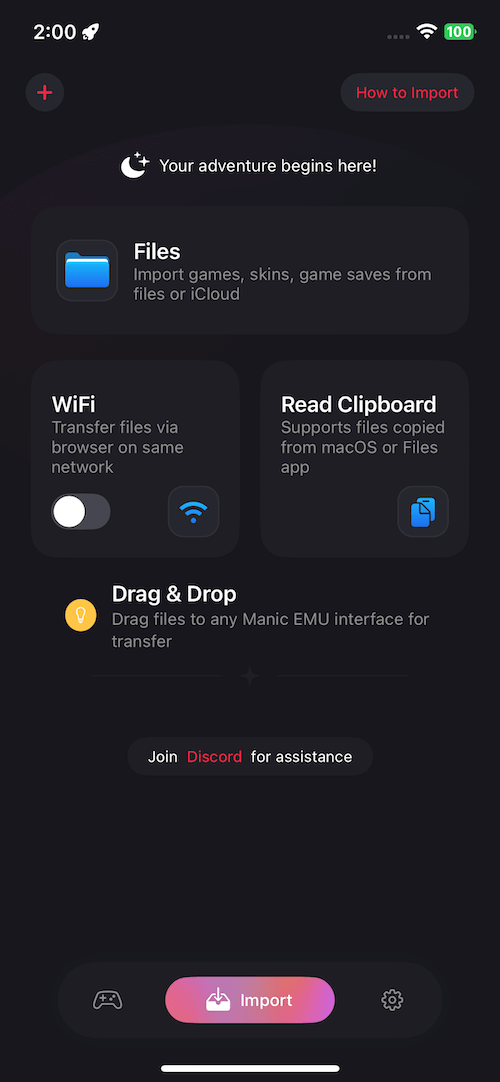
Section titled “📁 File Browser Import”- Launch the Manic EMU app.
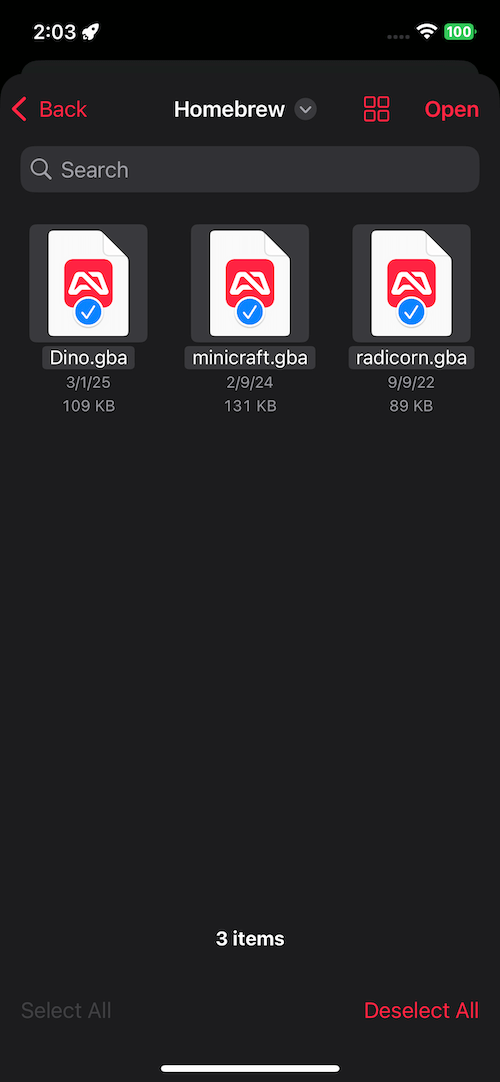
- Navigate to Import → Files.
- Select your target file to complete the import.
 |  |
|---|
📶 WiFi Wireless Transfer
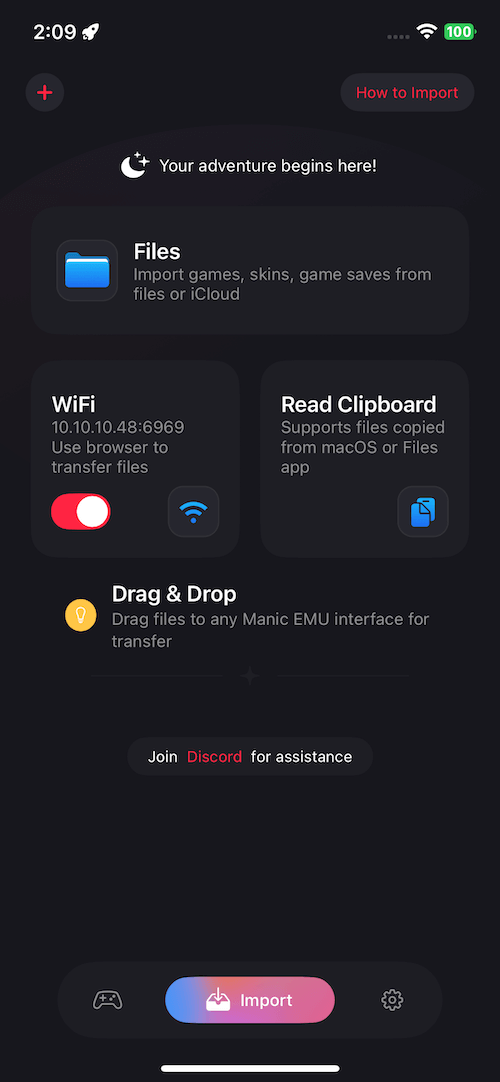
Section titled “📶 WiFi Wireless Transfer”- Go to Import → WiFi Transfer and toggle the switch to enable.
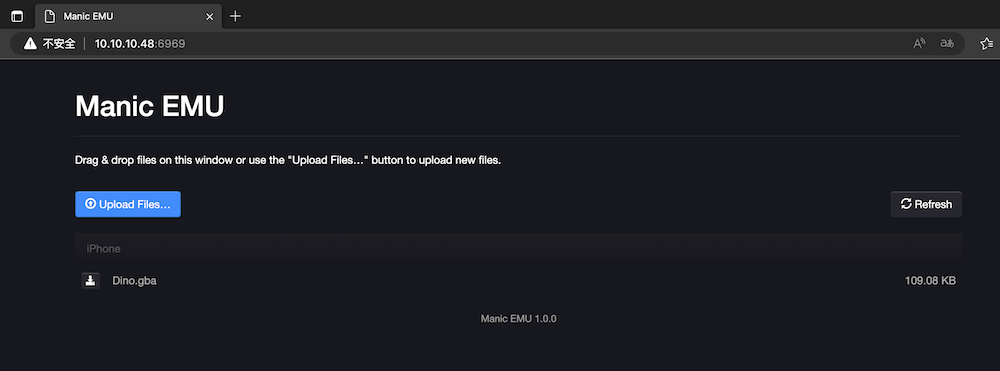
- Enter the displayed IP address in a browser on your computer or mobile device.
- Upload files via the browser interface.
📋 Clipboard Import
Section titled “📋 Clipboard Import”- Copy a game file in another app.
- Open the Import screen in Manic EMU.
- Tap Read Clipboard to automatically recognize the file.
✨ Drag-and-Drop Import
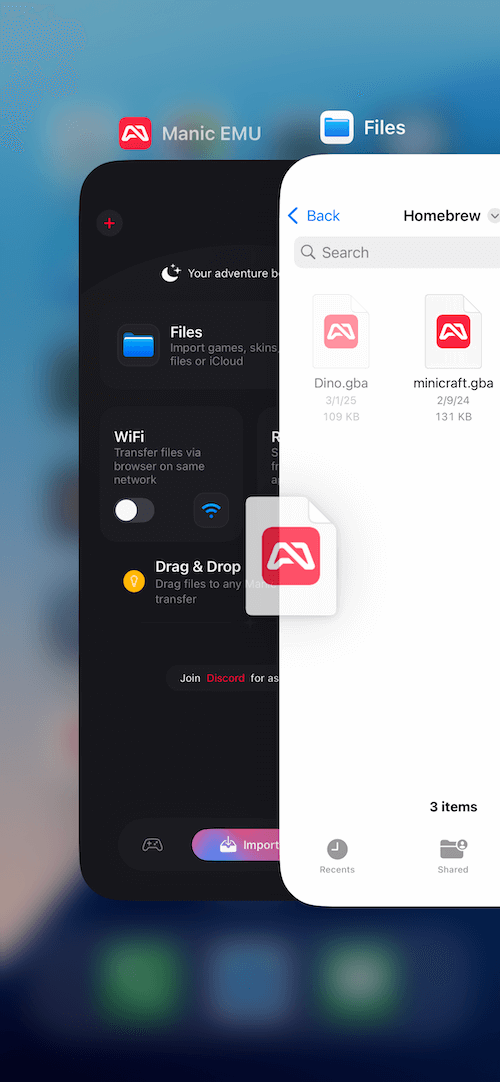
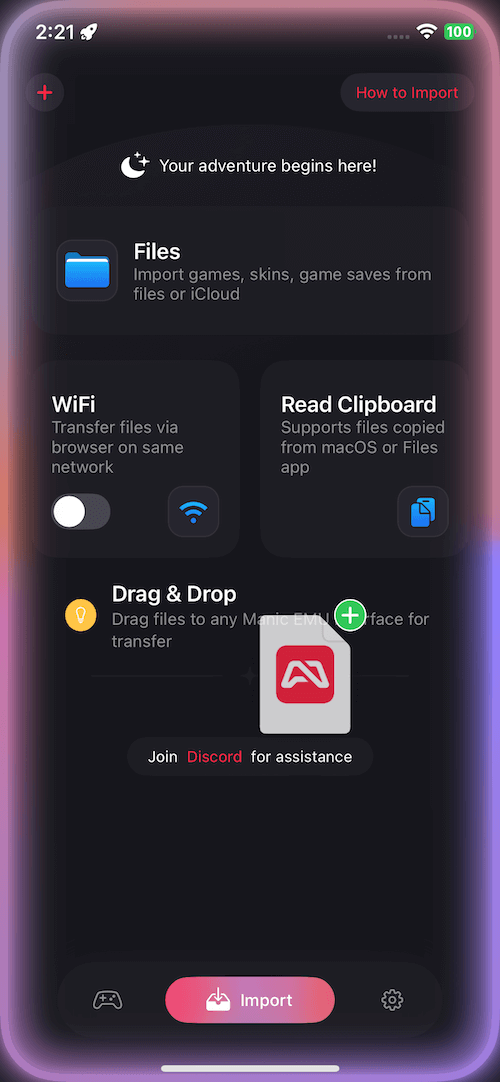
Section titled “✨ Drag-and-Drop Import”- From the Files app or any drag-enabled app:
- Long-press a file, drag it into Manic EMU’s interface,
- Release to complete the transfer.
 |  |
|---|
☁️ Cloud Services & Protocols
Section titled “☁️ Cloud Services & Protocols”- Tap the + button on the top-left of the Import screen (right side in Arabic regions).
- Select a cloud service or enter protocol parameters.
- Once connected, follow the same steps as local file import.
Pro Tip: WebDAV/SMB protocols are perfect for accessing NAS, router storage, and more!