Spielimport-Anleitung
Unterstützte Formate und Importwege
Abschnitt betitelt „Unterstützte Formate und Importwege“Manic EMU unterstützt die folgenden Spieldateiformate:
- Bandai WonderSwan/Color WS/WSC (.ws .wsc .pc2 .pcv2)
- Adobe Flash FLASH (.swf)
- Nintendo Wii (.rvz .wbfs .ciso .wia .iso .wad .dol .elf)
- Nintendo GameCube NGC (.gcm .gcz .rvz .iso .dol .elf)
- Commodore Amiga (.adf .adz .dms .fdi .ipf .hdf .hdz .lha .slave .info .cue .ccd .nrg .mds .iso .chd .uae .m3u .zip .7z .rp9)
- Commodore 64 C64 (.d64 .d71 .d80 .d81 .d82 .g64 .g41 .x64 .t64 .tap .prg .p00 .crt .bin .zip .gz .d6z .d7z .d8z .g6z .g4z .x6z .cmd .m3u .vfl .vsf .nib .nbz .d2m .d4m)
- Neo Geo Pocket/Color NGP/NGPC (.ngp .ngc .ngpc .npc)
- PC-Engine PCE (.pce .sgx .cue .ccd .chd .toc .m3u)
- Symbian (.sis .sisx .n-gage .7z .zip .rar)
- Microsoft DOS (.zip .dosz .exe .com .bat .iso .cue .img .ima .vhd .jrc .tc .m3u .conf)
- Sun Microsystems J2ME (.jar)
- DOOM (.wad .iwad .pwad)
- Atari Jaguar (.j64 .jag .rom .abs .cof .bin .prg)
- Atari Lynx (.lnx .o)
- Atari 7800 ProSystem (.a78 .bin .cdf)
- Atari 5200 SuperSystem (.a52 .bin)
- Atari 2600 (.a26 .bin)
- Arcade (.zip .7z .cmd)
- Sega Dreamcast (.cdi .gdi .chd .cue .bin .m3u)
- SONY PlayStation (.cue .m3u .pbp .chd .ccd)
- Nintendo Pokémon Mini (.min)
- Nintendo Virtual Boy (.vb .vboy)
- Nintendo 64 (.n64 .z64 .v64)
- Sega Saturn(.iso .chd .ccd)
- Sega Mega Drive/Genesis (.md .gen .smd .bin)
- Sega Mega-CD/Sega CD (.chd .iso)
- Sega Super 32X/Genesis 32X (.32x)
- Sega Master System (.sms .bms .bin)
- Sega Game Gear (.gg .bin)
- Sega SG-1000 (.sg)
- SONY PSP (.elf .iso .cso .prx .pbp .chd)
- Nintendo 3DS (.3ds .app .cci .cxi .cia)
- Nintendo DS (.ds .nds)
- Nintendo Game Boy (.gb)
- Nintendo Game Boy Color (.gbc)
- Nintendo Game Boy Advance (.gba)
- Nintendo Entertainment System (.fc .nes .unf .unif)
- Nintendo Famicom Disk System (.fds)
- Nintendo Super Entertainment System (.sfc .snes .fig .smc)
- Komprimierte Dateien (.zip .7z)
Spielstand-Formate:
- Bandai WonderSwan/Color WS/WSC (.srm)
- Adobe Flash FLASH (.json)
- Commodore Amiga (.nvr)
- Commodore 64 C64 (.nvr)
- Neo Geo Pocket/Color NGP/NGPC (.flash)
- PC-Engine PCE (.srm)
- Microsoft DOS (.pure.zip)
- Sun Microsystems J2ME (.J2meJS.srm .freej2me.srm)
- DOOM (.dsg)
- Atari Jaguar (.srm)
- Sega Dreamcast (VMU Memory Units)
- SNOY PlayStation (.srm .mcd .mcr)
- Nintendo Pokémon Mini (.eep)
- Nintendo Virtual Boy (.srm)
- Nintendo 64 (.srm)
- Sega Saturn (.srm .bkr)
- Sega Mega Drive/Genesis (.srm)
- Sega Mega-CD/Sega CD (.srm)
- Sega Super 32X/Genesis 32X (.srm)
- Sega Master System (.srm)
- Sega Game Gear (.srm)
- Sega SG-1000 (.srm)
- SONY PSP (.psp.sav)(Zip File Type)
- Nintendo 3DS (.3ds.sav)(Zip File Type)
- Nintendo DS (.dsv)
- Nintendo Game Boy (.sav)
- Nintendo Game Boy Color (.sav)
- Nintendo Game Boy Advance (.sav)
- Nintendo Entertainment System (.srm)
- Nintendo Famicom Disk System (.srm)
- Nintendo Super Entertainment System (.srm)
Mehrere Importwege für unterschiedliche Situationen:
- Lokal und Cloud: Direkt vom Gerätespeicher oder iCloud über den Dateibrowser.
- Funkübertragung: Dateien per WLAN im Browser hochladen.
- Geräteübergreifendes Einfügen: Mit Apple Handoff Dateien auf Mac oder anderen Geräten kopieren und in der App einfügen.
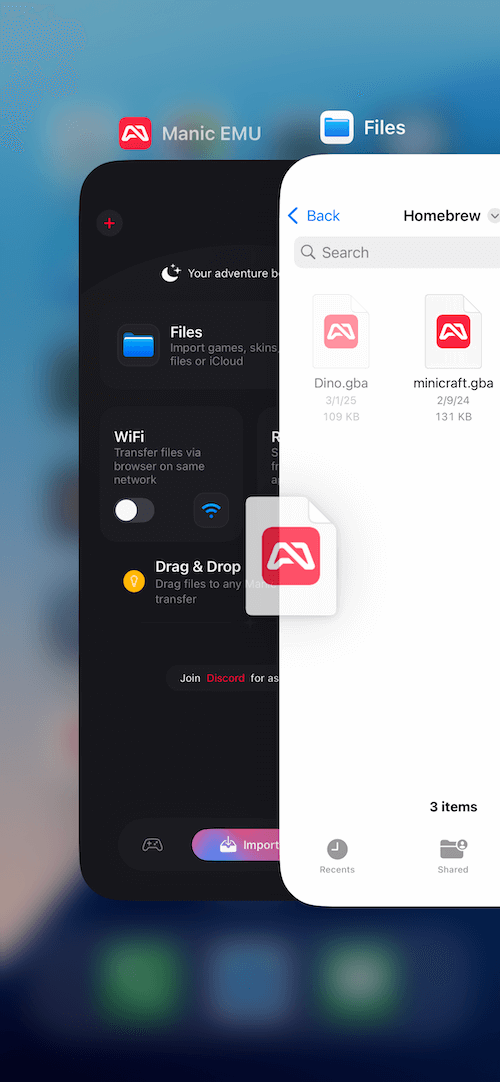
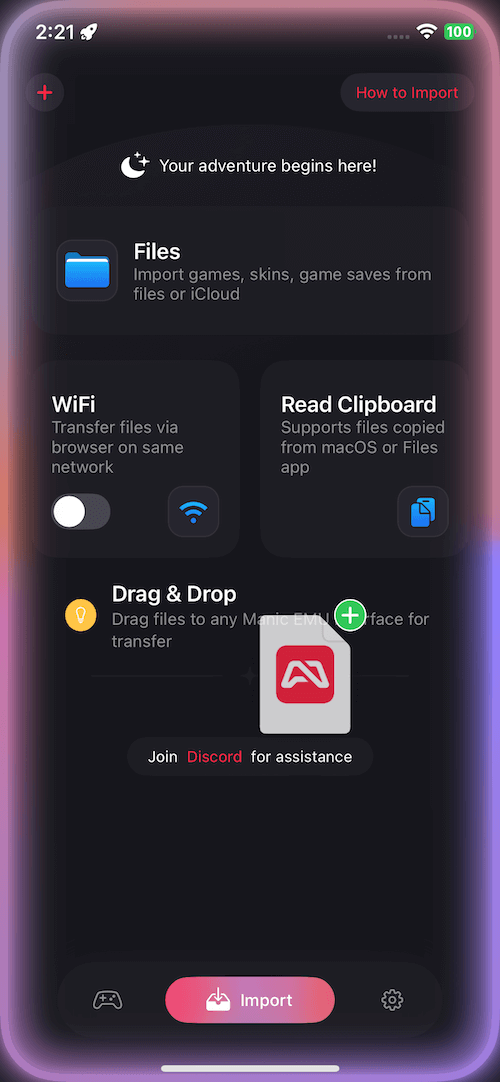
- Drag-and-Drop: Natives iOS-Drag-and-Drop—Datei gedrückt halten und in jede App-Oberfläche ziehen.
- Cloud-Dienste: Google Drive, Dropbox, OneDrive, Baidu Cloud und Alibaba Cloud.
- Protokoll-Erweiterungen: Dateien auf NAS oder privaten Servern über WebDAV/SMB.
Schritt für Schritt
Abschnitt betitelt „Schritt für Schritt“Dateibrowser-Import
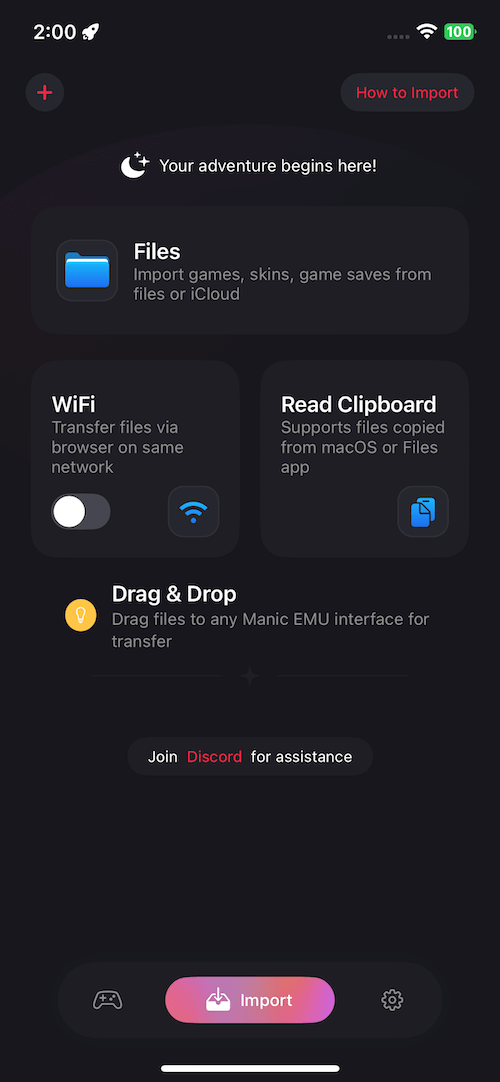
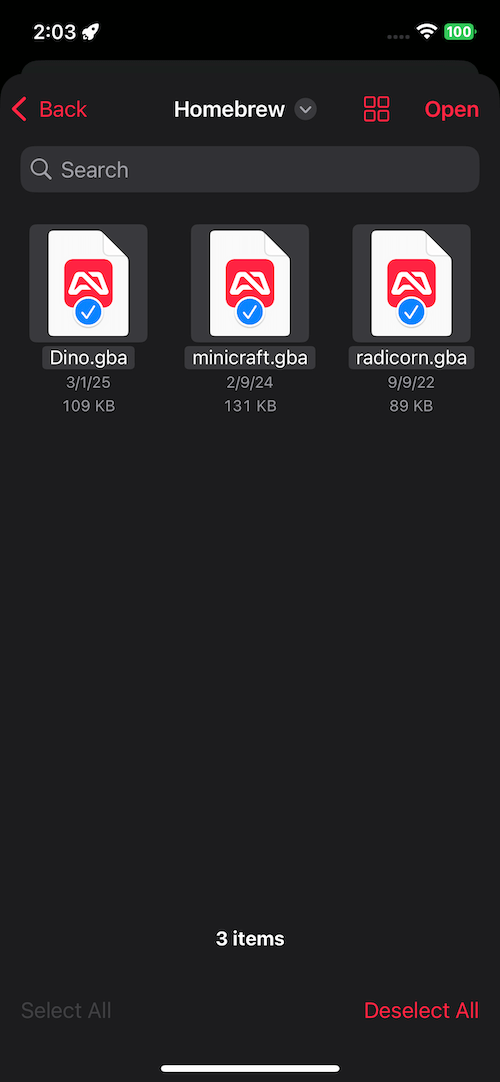
Abschnitt betitelt „Dateibrowser-Import“- Manic EMU starten.
- Zu Import → Dateien gehen.
- Zieldatei wählen—fertig.
 |  |
|---|
WLAN-Übertragung
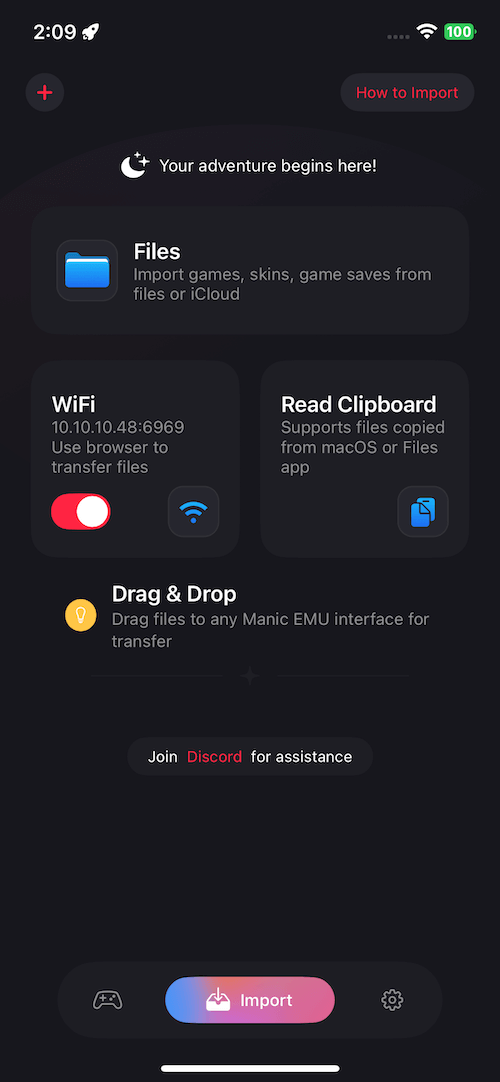
Abschnitt betitelt „WLAN-Übertragung“- Import → WLAN-Übertragung öffnen und den Schalter einschalten.
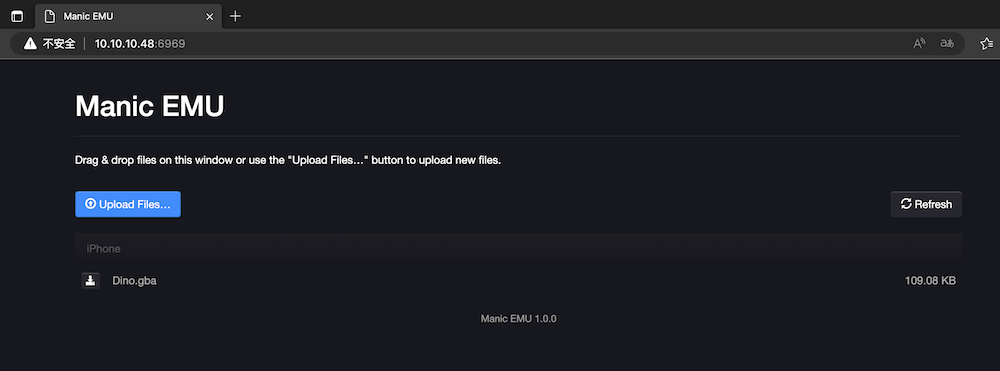
- Die angezeigte IP-Adresse in einem Browser auf Computer oder Mobilgerät eingeben.
- Dateien über die Browseroberfläche hochladen.
Zwischenablage-Import
Abschnitt betitelt „Zwischenablage-Import“- Spieldatei in einer anderen App kopieren.
- Den Import-Bildschirm in Manic EMU öffnen.
- Zwischenablage lesen tippen—die Datei wird erkannt.
Drag-and-Drop-Import
Abschnitt betitelt „Drag-and-Drop-Import“- Aus der App Dateien oder jeder Drag-fähigen App:
- Datei gedrückt halten, in die Manic-EMU-Oberfläche ziehen,
- loslassen—Übertragung fertig.
 |  |
|---|
Cloud-Dienste und Protokolle
Abschnitt betitelt „Cloud-Dienste und Protokolle“- Die +-Taste oben links im Import-Bildschirm tippen (rechts in arabischen Regionen).
- Cloud-Dienst wählen oder Protokollparameter eingeben.
- Nach der Verbindung wie beim lokalen Import vorgehen.
Tipp: WebDAV/SMB eignen sich gut für NAS, Router-Speicher und mehr.